
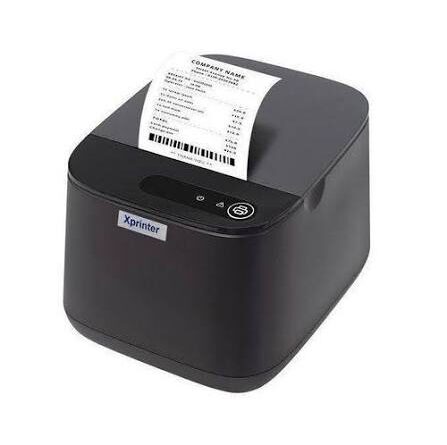
How Xprinter Thermal Printers Support Fast and Reliable Barcode Printing
Barcode printing plays an important role in modern inventory management, retail operations, logistics, and product identification. Businesses use barcodes to store information in a compact format that can be quickly scanned by compatible devices. Clear and accurate barcode labels help employees identify products, track stock movement, process sales, and manage shipments more efficiently.
Thermal printing technology is widely used for producing barcode labels because it can deliver consistent output at practical operating speeds. An Xprinter Thermal Printer can support barcode printing requirements when the selected model, printing method, label materials, and software are suitable for the application. Understanding how these printers work and what influences their performance can help businesses make better equipment decisions.
Understanding Thermal Barcode Printing
A thermal printer produces images and text by applying heat to a printing surface. It is commonly used for barcode labels because it can create precise lines, spaces, numbers, and other information needed for scanning.
There are two main thermal printing methods:
Direct Thermal Printing
Direct thermal printers use heat-sensitive paper or label materials. The printhead heats selected areas of the material, causing them to darken and form the required barcode or text.
This method does not require an ink ribbon, making it convenient for applications involving short-term labels. It is often used for shipping labels, receipts, and temporary product identification.
However, direct thermal labels can be sensitive to heat, sunlight, and environmental exposure. Their suitability depends on how long the barcode needs to remain readable and the conditions in which it will be stored.
Thermal Transfer Printing
Thermal transfer printers use a heated printhead to transfer ink from a ribbon onto label material. This method can produce durable prints on compatible paper, synthetic, and specialty label substrates.
Thermal transfer printing is often preferred when labels need to withstand handling, moisture, friction, or longer storage periods. The actual durability depends on the ribbon, label material, and environmental conditions.
Businesses should select between these methods according to their barcode lifespan and application requirements.
1. Fast Printing for High-Volume Operations
Printing speed is an important factor for companies that generate large numbers of barcode labels.
Warehouses, distribution centers, retail stores, and manufacturing facilities may need to print hundreds or thousands of labels during daily operations. Slow printing can create delays in product preparation, packaging, and inventory processing.
Thermal printers can support fast label production by creating barcodes directly on compatible materials. Once the printing job is configured, multiple labels can be generated in sequence without requiring the repeated manual setup associated with some other printing processes.
Actual speed depends on the printer model, resolution, label dimensions, connection type, and complexity of the printing job. Businesses should compare these specifications with their expected daily workload.
2. Clear Barcode Output for Accurate Scanning
A barcode must be printed clearly enough for a scanner to distinguish its individual lines, spaces, and encoded information.
Poor print quality can cause scanning failures, resulting in repeated attempts and unnecessary interruptions. Thermal printing can produce precise barcode patterns when the printer is correctly configured and suitable label materials are used.
Several factors influence barcode readability:
- Printhead resolution
- Barcode dimensions
- Printing speed
- Label surface quality
- Correct darkness settings
- Appropriate barcode design
- Proper spacing around the barcode
Businesses should test printed labels with their actual barcode scanners before beginning large-scale production. This helps confirm that the barcode can be read reliably in the intended working environment.
3. Support for Different Barcode Formats
Different industries use different barcode formats depending on the information they need to encode.
Common formats include:
Code 128: A versatile linear barcode used for inventory identification, shipping labels, and internal tracking.
Code 39: Often used for industrial identification and inventory applications.
EAN-13: Commonly used for retail products in many markets.
UPC-A: Widely used for identifying consumer products in retail environments.
QR Codes: Two-dimensional codes that can store more information than traditional linear barcodes.
Data Matrix: A compact two-dimensional barcode frequently used in manufacturing, electronics, and product traceability.
The supported barcode formats depend on the printer’s firmware, command language, and the software used to generate printing instructions. Businesses should verify compatibility before selecting a particular model.
4. Consistent Label Production for Inventory Management
Accurate inventory records depend on reliable product identification. Barcode labels allow businesses to associate physical products with digital information stored in inventory systems.
Thermal printers can help produce consistent labels containing product codes, stock numbers, descriptions, and other identification details.
When employees scan these labels, compatible inventory software can retrieve the corresponding product information. This reduces dependence on manual data entry and helps minimize identification errors.
Consistent label production is especially useful for businesses that handle different product categories, multiple storage locations, or frequent stock movements.
5. Integration With Barcode Software and Business Systems
Barcode printing is most effective when the printer works smoothly with the software used to manage products and inventory.
Many businesses use dedicated label-design applications, warehouse management systems, enterprise resource planning platforms, or POS software to create barcode printing jobs.
A compatible thermal printer receives the information and converts it into a printed label.
Before purchasing, companies should check:
- Supported operating systems
- Available printer drivers
- Compatible barcode software
- Supported printer command languages
- USB, Ethernet, or wireless connectivity options
- Integration requirements for existing business applications
Checking these details in advance can help prevent installation problems and reduce the time needed to introduce new printing equipment.
6. Flexible Label Sizes and Applications
Barcode labels come in different sizes depending on the product, packaging, and scanning requirements.
Small labels may be used for electronics, accessories, and compact retail products. Larger labels are common for shipping cartons, warehouse shelves, and industrial equipment.
The supported label dimensions vary by printer model. Businesses should review the maximum and minimum printing widths, media-loading requirements, and sensor configurations before purchasing.
Selecting suitable label dimensions helps ensure that barcodes remain readable without taking up unnecessary space on product packaging.
7. Reduced Dependence on Traditional Ink Supplies
Direct thermal printers do not require ink cartridges or toner to produce labels. Instead, they use heat-sensitive materials to create the printed image.
This simplifies the consumable requirements for businesses that produce temporary barcode labels or shipping documentation.
Thermal transfer models use ribbons, but they can support applications that require more durable labels. In either case, businesses should evaluate the total cost of label materials and other consumables rather than considering the printer purchase price alone.
The most economical option depends on printing volume, label lifespan, material costs, and operating conditions.
8. Improved Shipping and Logistics Operations
Shipping companies and distribution centers depend on accurate labels to identify packages and direct them through different stages of transportation.
Barcode labels may contain tracking numbers, destination information, handling details, and other shipment identifiers.
Thermal printers can support these activities by producing labels that are ready to attach to packages. When integrated with shipping software, the printing process can be linked to order processing and shipment preparation.
Reliable barcode output helps employees scan packages during sorting, dispatch, and receiving. This supports more organized handling and makes shipment information easier to retrieve.
9. Useful for Retail Product Identification
Retail businesses use barcodes to identify products, manage stock, and process transactions at checkout counters.
Thermal barcode printers can produce product labels containing standardized codes, internal stock identifiers, or pricing information. Employees can then apply these labels to products or packaging.
This is useful when retailers introduce new products, update stock records, or organize merchandise across different departments.
For retail applications, businesses should ensure that the barcode format matches the requirements of their POS system and the scanning equipment used at checkout.
10. Support for Manufacturing and Product Traceability
Manufacturers often need to identify individual products, components, batches, and production stages.
Barcode labels can connect physical items with digital production records, making it easier to track materials as they move through a facility.
Thermal printing can support the creation of labels containing:
- Product identification numbers
- Batch and lot codes
- Manufacturing dates
- Serial numbers
- Inspection references
- Work order information
For products exposed to heat, chemicals, moisture, or frequent handling, thermal transfer printing with suitable label materials may be more appropriate than direct thermal printing.
11. Practical Considerations for Reliable Barcode Printing
A printer’s performance depends on more than its maximum printing speed. Businesses need to consider the complete printing setup to achieve consistent results.
Choose the Correct Print Resolution
Print resolution is usually measured in dots per inch (DPI). Higher resolution can be beneficial for small barcodes, fine details, and compact labels.
However, resolution should match the barcode dimensions and scanning requirements. Not every application requires the highest available DPI.
Select Suitable Label Materials
The label material should match the printing method and intended environment. Direct thermal paper is suitable for many short-term applications, while thermal transfer materials may be preferable for labels requiring greater durability.
Adjust Printing Speed and Darkness
Printing too quickly or using unsuitable darkness settings can affect barcode clarity. Businesses should test different settings to find an appropriate balance between output speed and print quality.
Maintain the Printhead
Dust, adhesive residue, and other contaminants can interfere with heat transfer. Regular cleaning with approved materials helps maintain consistent print quality.
Test Labels Before Large Production Runs
A sample label should be checked using the scanners and software that will be used in daily operations. This helps identify sizing, contrast, or compatibility problems before they affect a large batch.
12. How to Choose the Right Thermal Printer for Barcode Printing
The most suitable printer depends on the type of labels a business needs, its printing volume, and the environment in which the equipment will operate.
| Selection Factor | What to Evaluate |
|---|---|
| Printing method | Direct thermal or thermal transfer |
| Resolution | Whether it can produce readable barcodes at the required size |
| Printing speed | Daily label volume and workflow requirements |
| Media compatibility | Supported label widths, thicknesses, and materials |
| Connectivity | USB, Ethernet, Bluetooth, or Wi-Fi availability |
| Barcode support | Required linear and two-dimensional formats |
| Software compatibility | Drivers, applications, and command languages |
| Durability | Suitability for the working environment |
| Maintenance | Cleaning requirements and replacement parts |
It is also important to consider the availability of technical support, warranty coverage, and compatible consumables. Reviewing these factors can help businesses select equipment that fits both current operations and future requirements.
Conclusion
Thermal printing provides a practical solution for businesses that need fast, consistent, and readable barcode labels. It supports a wide range of applications, including retail product identification, warehouse inventory control, shipping, logistics, and manufacturing traceability.
The performance of a barcode printing system depends on selecting the appropriate printing method, resolution, label material, software, and connectivity options. Regular maintenance and barcode scanning tests are also important for maintaining reliable results. By evaluating these requirements carefully, businesses can build a barcode printing process that supports accurate identification and more efficient daily operations.