
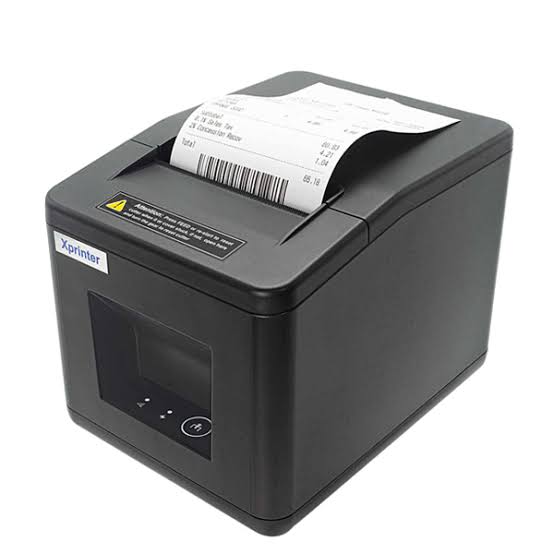
Factors to Consider When Investing in an Xprinter Receipt Printer
Receipt printers are essential tools for businesses that process customer payments and need to provide accurate transaction records. Retail stores, restaurants, supermarkets, pharmacies, and service providers rely on these devices to support checkout operations and maintain organized documentation. However, selecting the right printer requires more than comparing product prices or choosing a model with the highest advertised printing speed.
Businesses should consider their transaction volume, existing POS infrastructure, workspace limitations, maintenance requirements, and long-term operating costs before making a purchase. An Xprinter Receipt Printer may be one option to evaluate when comparing available printing solutions. A careful assessment of the following factors can help organizations make a suitable investment decision.
1. Business Requirements and Transaction Volume
The first step is to determine how the printer will be used in daily operations. A small retail shop may have relatively few transactions, while a supermarket or busy restaurant may print receipts continuously throughout the day.
Businesses should estimate their average daily printing volume and consider periods of increased demand. This information helps identify the performance level required for the intended application.
The number of checkout stations also matters. A business with several counters may need multiple printers, while a small service provider may require only one device. Selecting equipment according to actual workload can prevent unnecessary spending and reduce the risk of purchasing an underpowered model.
2. Printing Technology and Performance
Receipt printers use different printing technologies, but direct thermal printing is common in modern POS environments. It uses heat-sensitive paper to create text and images without traditional ink cartridges or ribbons.
This approach can simplify consumable management and support fast transaction printing. However, businesses should understand the performance specifications of each model before making a decision.
Printing Speed
Printing speed determines how quickly a receipt can be produced. Faster output may be useful in high-traffic environments where several customers complete transactions within a short period.
However, speed should not be considered independently. Businesses should also assess print quality, reliability, and the printer’s suitability for their expected workload.
Print Resolution
Print resolution affects the clarity of text, numbers, logos, and barcodes. Clear output is important because customers and employees must be able to read transaction details without difficulty.
Businesses that print detailed receipts should review the printer’s resolution and test sample output when possible.
Operating Reliability
A printer used throughout the working day should deliver consistent performance. Paper-feeding problems, connection interruptions, and unclear printing can slow checkout activities.
Reviewing product documentation, maintenance requirements, and available technical support can help businesses evaluate long-term reliability.
3. Connectivity and POS System Compatibility
Connectivity is a critical consideration because receipt printers must communicate with existing business equipment. Different models may support USB, Ethernet, serial, Bluetooth, or Wi-Fi connections.
USB is commonly used for direct connections to individual computers and POS terminals. Ethernet can support network-based installations, while wireless options may be useful for compatible mobile checkout arrangements.
Businesses should confirm the exact interfaces available on the selected model. They should also verify operating system support, printer driver availability, supported command languages, and compatibility with their POS applications.
A printer that has suitable hardware specifications may still be unsuitable if it cannot communicate correctly with the business’s software. Testing compatibility before purchasing multiple units can help avoid installation problems.
4. Paper Compatibility and Consumable Requirements
Paper compatibility affects both printing quality and daily operating convenience. Thermal receipt printers require suitable heat-sensitive paper that matches the equipment’s supported dimensions and specifications.
Important details include:
- Paper width: Common formats include 58 mm and 80 mm, depending on the printer model.
- Roll diameter: The roll must fit within the printer’s paper compartment.
- Paper thickness: The paper should meet the manufacturer’s recommended range.
- Core size: The roll’s central tube must be compatible with the paper holder.
- Coating quality: Consistent thermal coating helps produce clear and uniform output.
Businesses should check these specifications before purchasing paper supplies. Using incompatible rolls may cause feeding difficulties, paper jams, or inconsistent printing.
It is also worth considering local paper availability. A printer that uses easily sourced consumables may be more convenient to operate over time.
5. Printer Size and Installation Requirements
The physical dimensions of a receipt printer can influence how easily it fits into a workplace. Retail counters, restaurant billing stations, and reception desks often contain several devices, leaving limited space for additional equipment.
Compact printers may be suitable for smaller workstations, while larger environments may prioritize printing capacity and other performance features.
Before purchasing, businesses should measure the available installation area and consider access to power outlets, data connections, and paper compartments. The printer should be positioned where employees can replace paper rolls and perform routine maintenance conveniently.
6. Initial Purchase Price and Long-Term Costs
The purchase price is only one part of the total investment. Businesses should also consider the ongoing costs associated with operating and maintaining the printer.
These may include:
- Thermal paper consumption.
- Replacement components and accessories.
- Maintenance and cleaning supplies.
- Technical support or repair expenses.
- Driver and software management.
- Equipment replacement over time.
A lower-priced model may not always offer the best overall value if it has higher maintenance requirements or does not meet the business’s workload. Similarly, a more expensive printer may include features that a small business does not need.
Comparing total ownership costs can help organizations make more balanced purchasing decisions.
7. Ease of Installation and Daily Operation
Receipt printers should be straightforward for employees to install, configure, and use. Complicated setup procedures can increase deployment time and create additional demands on technical staff.
Businesses should review the availability of installation guides, drivers, configuration tools, and troubleshooting documentation. Easy paper loading, accessible controls, and clear status indicators can also improve daily usability.
Employee training is another consideration. Staff members should know how to replace paper, identify common error messages, and clear minor paper jams safely.
8. Maintenance Requirements and Product Support
Routine maintenance helps preserve printing quality and reduce avoidable interruptions. Businesses should understand the cleaning procedures and recommended maintenance intervals for the selected printer.
Basic maintenance generally involves cleaning the print head according to manufacturer instructions, removing paper dust, checking cables, and using compatible receipt paper.
Manufacturer documentation and technical assistance can also influence the overall purchasing decision. Businesses should investigate the availability of replacement parts, warranty information, and support resources before committing to a particular model.
For organizations operating several printers, accessible technical support can be especially valuable when equipment problems affect multiple checkout stations.
9. Future Business Growth and Scalability
Business requirements can change as organizations expand their operations. A small retailer may introduce additional checkout counters, while a restaurant may add service stations or update its POS platform.
A printer should therefore be evaluated according to both current requirements and reasonable future plans. Connectivity options, software compatibility, and expected workload should be considered when assessing whether a model can remain useful as operations develop.
Businesses with multiple locations may also benefit from standardizing compatible printer models. This can simplify employee training, paper purchasing, maintenance procedures, and technical support.
10. Security and Network Management
As more businesses use network-connected POS equipment, basic network management becomes increasingly important. Printers connected to business networks should be configured according to the organization’s IT policies.
Businesses should review available network settings, access controls, firmware management, and the manufacturer’s security documentation where applicable. Wireless connections should use appropriate network protections.
It is also important to remember that a receipt printer is only one component of a larger POS environment. Security depends on the configuration and maintenance of the complete system, including computers, payment terminals, software, and network infrastructure.
11. Compare Models Using a Practical Checklist
A structured comparison can help businesses identify which printer best matches their requirements.
| Evaluation factor | Questions to consider |
|---|---|
| Workload | Can the printer handle expected daily transactions? |
| Printing performance | Are speed and resolution suitable? |
| Connectivity | Does it support the required connection type? |
| POS compatibility | Are drivers and software support available? |
| Paper requirements | Can compatible paper be sourced easily? |
| Physical design | Does it fit the available workspace? |
| Maintenance | Are cleaning and servicing manageable? |
| Support | Are documentation, warranty details, and technical assistance available? |
| Total cost | Are long-term operating expenses reasonable? |
| Future needs | Can it support expected business changes? |
Comparing several models against the same criteria makes it easier to distinguish essential features from optional ones.
12. Test Before Making a Large Purchase
Businesses planning to purchase several printers should consider testing a sample unit first. A practical evaluation can reveal compatibility or usability issues that may not be obvious from product descriptions.
The test should include connecting the printer to the actual POS system, printing different receipt formats, checking paper feeding, and evaluating output clarity. Employees can also assess how easily paper rolls are replaced and whether the device fits the intended workspace.
For businesses with multiple locations, testing should account for different network configurations and software environments. This approach can reduce the risk of purchasing equipment that does not perform as expected after installation.
Conclusion
Investing in a receipt printer requires careful consideration of business requirements, printing performance, connectivity, paper compatibility, installation needs, maintenance, and long-term costs. The most suitable equipment is not necessarily the model with the highest specifications or the lowest purchase price. It is the one that meets the organization’s actual transaction requirements and works effectively with its existing POS infrastructure.
When evaluating an Xprinter receipt printer, businesses should compare individual model specifications, confirm software compatibility, and assess available support resources. Taking these steps before purchasing can help organizations make a more informed investment and establish a reliable receipt printing process for everyday operations.