
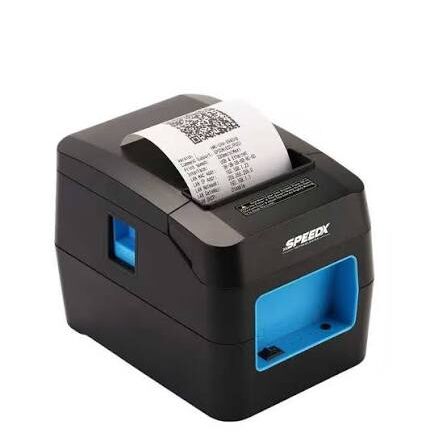
Maintenance Tips to Extend the Lifespan of a Thermal Receipt Printer
Thermal receipt printers are essential tools for businesses that handle regular customer transactions. Retail stores, restaurants, supermarkets, pharmacies, and service centers depend on these devices to generate receipts quickly and maintain organized payment records. Although thermal printers are generally designed for frequent use and require less maintenance than traditional ink-based printers, proper care is still necessary to ensure consistent performance and prevent premature component failure.
A Thermal Receipt Printer uses a heat-sensitive printing mechanism to produce text, numbers, and graphics without conventional ink or toner. Its performance depends on several components, including the thermal printhead, paper feed rollers, automatic cutter, and electronic connections. Following a regular maintenance routine can help reduce printing problems, minimize downtime, and extend the equipment’s useful lifespan.
1. Clean the Thermal Printhead Regularly
The thermal printhead is one of the most important components because it generates the heat required to produce printed content. Over time, dust, paper residue, and other contaminants can accumulate on its surface.
A dirty printhead may cause faded text, missing characters, or uneven printing quality.
To maintain it properly:
- Turn off the printer and allow the printhead to cool.
- Open the printer cover according to the manufacturer’s instructions.
- Use an approved cleaning solution and a suitable lint-free cloth or cleaning swab.
- Gently remove visible residue without scratching the printhead.
- Allow the surface to dry completely before using the printer again.
Regular cleaning helps maintain clear output and reduces unnecessary wear on the printing mechanism.
2. Always Use Compatible Thermal Paper
Paper quality has a direct influence on printing performance. Thermal receipt printers require specially coated paper that reacts to heat from the printhead.
Using unsuitable or low-quality paper can result in faded receipts, excessive residue, and inconsistent printing.
Check the manufacturer’s specifications before purchasing paper rolls. Pay attention to paper width, roll diameter, thickness, and coating quality.
Compatible thermal paper helps maintain consistent printing results and reduces the risk of unnecessary maintenance problems.
3. Store Thermal Paper Under Suitable Conditions
Proper paper storage is often overlooked, even though environmental conditions can affect thermal paper quality.
Excessive heat, direct sunlight, humidity, and certain chemicals may cause thermal paper to darken or lose its sensitivity.
Follow these storage practices:
- Keep paper rolls in a cool and dry location.
- Avoid placing them near heating equipment or direct sunlight.
- Store unused rolls in their original packaging when possible.
- Keep paper away from oils, solvents, and other potentially damaging substances.
Good storage practices help preserve paper quality and ensure readable receipts.
4. Keep the Paper Feed Mechanism Clean
The paper feed mechanism controls how thermal paper moves through the printer. Dust and paper fragments can accumulate around rollers and affect smooth feeding.
If the rollers become dirty, the printer may produce misaligned receipts, experience paper jams, or feed paper unevenly.
Inspect the accessible paper path regularly. Remove loose paper fragments and clean the rollers using the manufacturer’s recommended method.
Avoid using sharp tools or excessive force because these actions may damage internal components.
5. Maintain the Automatic Cutter
Many modern thermal receipt printers include an automatic cutter that separates printed receipts from the paper roll.
Frequent operation can eventually lead to paper buildup or mechanical wear around the cutting mechanism.
To maintain the cutter, inspect the accessible area for paper fragments and follow the manufacturer’s cleaning instructions. Do not force a stuck blade or attempt to disassemble the mechanism without proper technical knowledge.
If cutting becomes inconsistent or the printer produces unusual mechanical noises, professional inspection may be necessary.
6. Avoid Overheating During Continuous Operation
Printers used in supermarkets, restaurants, and busy retail stores may operate for extended periods. Continuous printing can generate heat around the printhead and internal components.
Although commercial printers are designed for regular workloads, businesses should follow the manufacturer’s operating limits and recommended environmental conditions.
Keep ventilation openings unobstructed and avoid installing the printer near other heat-generating equipment.
Allowing the device to operate within its specified temperature range can help reduce unnecessary thermal stress.
7. Protect the Printer From Dust and Moisture
Dust and moisture can affect both the mechanical and electronic components of receipt printers.
Dust accumulation may interfere with paper movement, while moisture can damage electrical connections and other internal parts.
Place the printer on a clean, stable surface away from water sources and excessive airborne contaminants. When the device is not being used, keeping it covered with a suitable protective cover can help prevent dust accumulation.
However, ensure that the printer is completely cool and powered off before covering it.
8. Inspect Cables and Electrical Connections
Stable electrical connections are important for consistent printer operation. Loose or damaged cables can cause unexpected shutdowns, communication failures, and interrupted transactions.
Regularly inspect the power adapter, USB cables, Ethernet connections, and other interfaces used by the printer.
Use only compatible power supplies that meet the manufacturer’s specifications. Avoid bending cables excessively or placing heavy objects on them.
If a power adapter or cable shows signs of damage, replace it with an appropriate compatible component.
9. Update Printer Drivers and Firmware
Software maintenance is another important part of keeping printing equipment functional.
Outdated drivers may create compatibility problems with POS systems, computers, or operating systems. Firmware updates may also address certain performance or communication issues.
Check the manufacturer’s official support resources for available updates and installation instructions.
Before updating firmware, verify the exact printer model and follow the recommended procedure to avoid interruptions or configuration problems.
10. Handle Paper Rolls and Printer Covers Carefully
Incorrect paper installation can cause feeding problems and unnecessary mechanical stress.
When replacing a roll, make sure the paper is positioned correctly and that the cover closes securely. Avoid pulling the paper forcefully or inserting unsuitable materials into the paper path.
Employees should also receive basic training on operating the printer, replacing paper rolls, and recognizing common warning indicators.
Careful handling can prevent avoidable damage during everyday business operations.
11. Follow a Regular Maintenance Schedule
A consistent maintenance schedule makes it easier to identify minor problems before they become serious.
Businesses can organize routine maintenance according to printer usage and manufacturer recommendations.
| Maintenance Task | Suggested Frequency |
|---|---|
| Inspect paper quality | When replacing rolls |
| Check cables and connections | Weekly |
| Inspect paper feed mechanism | Weekly |
| Clean printhead | According to usage and manufacturer guidance |
| Inspect automatic cutter | Regularly, based on usage |
| Check drivers and firmware | Periodically |
| General equipment inspection | Monthly |
These intervals are general guidelines. High-volume printing environments may require more frequent inspections.
Signs That Your Thermal Receipt Printer Needs Servicing
Even with regular maintenance, printer components can eventually experience wear.
Watch for warning signs such as:
- Repeated faded or uneven printing.
- Frequent paper jams.
- Unusual grinding or clicking noises.
- Inconsistent paper feeding.
- Automatic cutter failures.
- Repeated connectivity or power problems.
If basic cleaning and troubleshooting do not resolve these issues, contact a qualified technician. Timely servicing can prevent minor faults from developing into more expensive equipment problems.
Conclusion
Extending the lifespan of a thermal receipt printer requires consistent cleaning, compatible paper supplies, proper storage, and careful handling. Maintaining the printhead, rollers, automatic cutter, and electrical connections can help preserve printing quality and reduce unexpected interruptions.
Businesses should also follow manufacturer maintenance recommendations and establish regular inspection routines based on their daily printing volume. With appropriate care, thermal receipt printers can provide dependable performance and support efficient transaction processing over an extended period.