
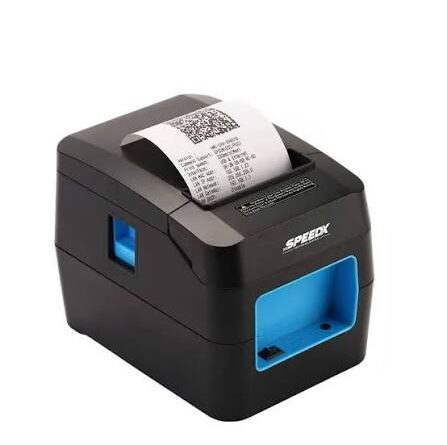
Future Trends in Thermal Printing Technology and Business Applications
Thermal printing technology continues to evolve as businesses look for faster, more reliable, and cost-effective ways to manage receipts, product labels, barcodes, shipping documents, and other printed information. Retail stores, warehouses, healthcare facilities, manufacturing plants, and logistics companies increasingly depend on printing equipment to support everyday operations.
Modern printing solutions are also becoming more connected, compact, and adaptable. Improvements in printhead design, wireless communication, software integration, and automation are creating new opportunities for businesses to improve their workflows. As these developments continue, selecting a suitable Thermal Printer involves considering not only current printing requirements but also future operational needs.
Understanding emerging trends can help organizations make informed equipment decisions and prepare for changes in business printing applications.
1. Greater Integration with Cloud-Based Systems
Cloud technology is changing how businesses manage information, inventory, transactions, and shipping operations. Thermal printing is becoming increasingly connected to these digital systems.
Cloud-based business applications can generate printing instructions when specific events occur. For example, an online order management platform may create a shipping label after an order is confirmed and prepared for dispatch.
This approach can reduce manual steps and support more consistent printing workflows.
Potential Business Benefits
- Centralized management of printing activities.
- Easier coordination between different business locations.
- Better integration with inventory and order management platforms.
- Automated generation of receipts and shipping labels.
- More flexible access through compatible devices and applications.
However, cloud printing capabilities depend on printer compatibility, software support, network configuration, and security requirements. Some systems may also need a local computer or print server to manage communication with the printer.
2. Expansion of Wireless and Mobile Printing
<AsyncImage query=”modern portable wireless Bluetooth thermal receipt printer smartphone mobile point of sale” aspectRatio=”16:9″ width=”100%”/>
Wireless connectivity is becoming an important feature in modern business printing environments. Wi-Fi and Bluetooth allow compatible thermal printers to receive print jobs from computers, tablets, smartphones, and other devices without requiring a direct data cable.
This flexibility is especially useful for businesses that use mobile point-of-sale systems or operate across multiple work areas.
Applications Across Different Industries
Retail: Employees can print receipts from mobile checkout devices or temporary sales stations.
Hospitality: Restaurants can send order tickets to compatible printers positioned in different service areas.
Logistics: Delivery personnel can print receipts and shipment documents using portable equipment.
Warehousing: Employees can send label-printing requests from handheld computers or tablets.
As wireless technologies improve, businesses may benefit from more flexible printer placement and easier integration with mobile workflows. Network security and reliable connectivity will remain important considerations.
3. Smarter Printing Through Automation
Automation is becoming more common in inventory management, order processing, manufacturing, and distribution. Thermal printers can support these systems by producing labels and receipts automatically when specific operations are completed.
For example, a warehouse management system may generate a barcode label when a product is received into inventory. Similarly, a manufacturing platform may create identification labels after a production batch passes inspection.
Automated printing can help reduce manual data entry and improve consistency.
Examples of Automated Printing
- Printing shipping labels after order confirmation.
- Generating product identification labels during manufacturing.
- Producing inventory tags after stock registration.
- Printing receipts automatically after payment.
- Creating batch labels during packaging operations.
The effectiveness of automated printing depends on accurate business data, compatible software, and properly configured equipment.
4. Improvements in Printhead Technology
The printhead is one of the most important components of a thermal printer. It contains heating elements that create text, graphics, and barcodes on compatible printing materials.
Future improvements in printhead design may focus on greater precision, consistent heating, durability, and energy efficiency.
Potential developments include:
- More consistent heat distribution.
- Improved control over printing density.
- Better performance with detailed labels.
- Increased resistance to wear under suitable operating conditions.
- Improved monitoring of printhead performance.
These improvements could help businesses maintain clearer output and reduce printing defects. However, actual performance will depend on the design and specifications of individual products.
5. Higher Resolution for Detailed Label Printing
<AsyncImage query=”high resolution thermal barcode label printer producing small detailed product labels” aspectRatio=”16:9″ width=”100%”/>
Businesses increasingly use compact labels containing detailed information, including small text, product codes, serial numbers, and barcodes.
Higher-resolution printing can help reproduce these elements more accurately. Common thermal printer resolutions include 203 DPI and 300 DPI, while some specialized applications use 600 DPI.
Future equipment may offer more flexible resolution options and improved print quality for demanding identification tasks.
Industries That May Benefit
Healthcare: Smaller labels may need clear patient or specimen identification information.
Electronics manufacturing: Compact components often require detailed product codes and identification labels.
Pharmaceutical packaging: Product information and traceability codes may require accurate printing.
Retail: Small product labels may contain pricing, descriptions, and barcode information.
Higher resolution is not necessary for every application. Businesses should choose equipment based on the smallest printed elements and the requirements of their scanning systems.
6. Greater Use of Sustainable Printing Materials
Environmental considerations are influencing purchasing decisions across many industries. Businesses are increasingly evaluating the materials used in packaging, labeling, and everyday printing operations.
Thermal printing manufacturers and material suppliers may continue exploring ways to reduce waste and improve the environmental characteristics of their products.
Possible Areas of Development
- Paper sourced through responsible forestry practices.
- Thermal coatings designed to meet relevant chemical requirements.
- Reduced packaging material.
- More efficient use of paper and labels.
- Improved manufacturing resource efficiency.
- Better recycling and waste-management guidance.
Businesses should evaluate environmental claims carefully and request supporting product information. Thermal paper recycling options can vary depending on coating composition and local recycling facilities.
Reducing unnecessary printing and selecting appropriate label dimensions can also help limit material consumption.
7. Compact and Portable Thermal Printing Equipment
<AsyncImage query=”compact portable mobile thermal label printer handheld business field service” aspectRatio=”16:9″ width=”100%”/>
Mobile business operations are creating demand for smaller and more portable printing devices.
Compact thermal printers can support employees who need to print receipts, tickets, or labels away from a fixed workstation. Rechargeable batteries and wireless connections make these devices particularly useful for mobile workflows.
Common Applications
- Delivery and courier services.
- Outdoor retail operations.
- Field service documentation.
- Mobile ticketing.
- Temporary sales locations.
- Inventory checks in large facilities.
Future portable printers may focus on improved battery performance, lighter construction, easier media replacement, and better connectivity.
Businesses choosing portable equipment should consider battery life, printing volume, supported media, connection range, and device durability.
8. Deeper Integration with Enterprise Software
Modern businesses use a variety of software platforms to manage sales, production, inventory, shipping, and customer information. Printing equipment needs to communicate reliably with these systems.
Thermal printers are increasingly used as part of larger digital workflows rather than as independent devices.
For example, a distribution center may connect its label printers to a warehouse management system. When employees scan an item, the software can retrieve product details and send the appropriate label information to a compatible printer.
Future developments may include:
- Easier integration with business applications.
- More standardized communication protocols.
- Improved printer configuration tools.
- Better support for centralized device management.
- More efficient handling of large printing queues.
These capabilities can help businesses coordinate printing across different departments and locations.
9. Better Printer Monitoring and Predictive Maintenance
Unexpected printer failures can interrupt checkout operations, shipment preparation, and production activities. As connected equipment becomes more common, monitoring tools may help businesses identify problems before they cause major disruptions.
Modern printer management systems can provide information about device status, media availability, connectivity, and selected error conditions.
Future developments may expand these capabilities through more advanced diagnostics and data analysis.
Potential Monitoring Functions
Printhead condition monitoring: Systems may provide more useful indicators of printhead wear or performance.
Media alerts: Notifications can help employees identify low paper or label supplies.
Error reporting: Detailed status information can make troubleshooting easier.
Usage tracking: Printing statistics can help organizations plan maintenance and supply requirements.
Remote administration: Authorized technicians may be able to review selected printer settings without visiting every workstation.
Predictive maintenance capabilities will vary by manufacturer and model. Businesses should verify which monitoring functions are actually supported before making purchasing decisions.
10. Increased Adoption of Durable Labeling Solutions
Not all printed labels are used in controlled indoor environments. Manufacturing facilities, transportation companies, and outdoor operations may require labels that withstand moisture, friction, heat, chemicals, or frequent handling.
Thermal transfer printing is particularly relevant in applications that require durable identification labels.
The combination of a suitable ribbon and label material can help produce output with greater resistance to specific environmental conditions.
Common Applications
- Industrial equipment identification.
- Warehouse asset tracking.
- Product serial number labels.
- Manufacturing batch identification.
- Electrical component labeling.
- Logistics and long-term inventory management.
Future developments may focus on improved media formulations and more specialized ribbon technologies. Businesses should evaluate the complete label system rather than assuming that a particular printing method guarantees durability.
11. Improved Barcode and Product Traceability Applications
<AsyncImage query=”warehouse product barcode QR code thermal printed labels close up” aspectRatio=”16:9″ width=”100%”/>
Product traceability is increasingly important in manufacturing, food distribution, healthcare, retail, and logistics. Businesses use barcodes and other machine-readable information to identify products and track their movement through supply chains.
Thermal printers play an important role by producing labels that contain identification numbers, batch details, tracking information, and other relevant data.
Future applications may involve greater use of:
- QR codes.
- Two-dimensional barcodes.
- Serial number labels.
- Batch and lot identification.
- Product tracking labels.
- Automated inventory identification.
As these applications expand, print quality and data accuracy will remain essential. Businesses must ensure that printed codes meet relevant specifications and can be read by the scanners used in their operations.
12. More Flexible Printing Across Multiple Industries
Thermal printing is no longer limited to traditional receipts and shipping labels. Its applications continue to expand as businesses adopt digital identification and transaction systems.
Retail and E-Commerce
Retailers use thermal printing for receipts, price labels, shelf tags, shipping documents, and product identification. E-commerce businesses rely on it for order fulfillment and package tracking.
Healthcare
Healthcare facilities use thermal printing for administrative labels, specimen identification, patient-related documentation, and selected medication labeling workflows. Accuracy and compliance with applicable requirements are essential.
Manufacturing
Manufacturers use thermal printers to identify components, production batches, finished products, and packaging materials.
Transportation
Transportation companies use thermal printing for tickets, baggage labels, parcel identification, and tracking documents.
Hospitality
Hotels, restaurants, and service providers use thermal printers for receipts, order tickets, queue management, and transaction records.
As business processes become more digital, these applications may become increasingly integrated with automated information systems.
13. Greater Focus on Energy Efficiency
Energy efficiency is another area that may influence future thermal printing equipment.
Thermal printers already use heat-based printing mechanisms rather than conventional ink or toner systems. However, their power requirements still depend on printhead design, operating conditions, printing speed, and workload.
Future improvements may focus on:
- More efficient heating elements.
- Better power management.
- Reduced energy consumption during standby.
- Improved control of printhead temperature.
- More efficient portable battery operation.
These developments could help businesses manage energy usage, particularly when operating large numbers of printing devices.
The actual benefits will depend on product design and operating patterns, so businesses should review technical specifications when comparing models.
14. Enhanced User Interfaces and Easier Printer Management
Printer setup and maintenance can become challenging when businesses operate multiple devices or use different printing applications.
Modern equipment may include clearer status indicators, simplified configuration tools, and more accessible maintenance instructions.
Future user-interface improvements could make it easier to:
- Configure wireless connections.
- Select paper and label settings.
- Monitor printer status.
- Identify common errors.
- Update compatible firmware.
- Manage multiple devices.
Simpler management tools can reduce the training required for employees and help organizations resolve routine problems more efficiently.
15. The Role of Data Security in Connected Printing
As thermal printers become more integrated with wireless networks and business software, security will remain an important consideration.
Printers may handle information such as customer transaction details, shipment addresses, inventory records, and product identification data.
Organizations should consider security during equipment selection and installation.
Important practices include:
- Using secure wireless network configurations.
- Changing default administrative passwords.
- Restricting access to authorized devices.
- Installing manufacturer-supported firmware updates.
- Disabling unnecessary network services.
- Following organizational data protection policies.
- Reviewing remote management permissions.
Future connected printing systems may offer improved security management features, but businesses will still need to configure and maintain them correctly.
16. How Businesses Can Prepare for Future Thermal Printing Developments
Organizations do not need to replace all existing printing equipment immediately to benefit from technological progress. A practical approach is to evaluate current requirements and identify areas where updated capabilities could improve operations.
Review Existing Printing Workflows
Identify how many receipts, labels, and documents are produced each day. Determine where printing delays or equipment limitations occur.
Evaluate Connectivity Requirements
Consider whether Wi-Fi, Bluetooth, or network-based printing could support more flexible operations.
Check Software Compatibility
Before purchasing new equipment, confirm that it works with existing POS, inventory, warehouse, and shipping applications.
Consider Future Printing Volume
Select a model with sufficient capacity for expected business growth, while avoiding unnecessary features.
Assess Media Requirements
Review paper sizes, label materials, ribbons, durability needs, and printing resolution.
Compare Total Ownership Costs
Evaluate equipment price, consumables, maintenance, technical support, and expected service life rather than focusing only on the initial investment.
17. Challenges That May Influence Future Adoption
Although thermal printing technology offers several opportunities, businesses may encounter challenges when adopting newer equipment.
Compatibility limitations: New printers may require updated drivers, applications, or network configurations.
Initial investment: Advanced models with specialized features may cost more than basic equipment.
Security management: Connected devices require suitable access controls and regular maintenance.
Consumable availability: Businesses must ensure that compatible paper, labels, and ribbons remain accessible.
Employee training: New printing systems may require staff to learn updated configuration and operating procedures.
Technology selection: Not every emerging feature will provide meaningful benefits for every business.
Evaluating these factors can help organizations adopt new printing solutions at a practical pace.
Conclusion
Thermal printing technology is developing alongside broader changes in business automation, mobile computing, cloud software, and digital supply chain management. Wireless connectivity, improved printhead performance, higher-resolution output, portable equipment, automated workflows, and smarter maintenance tools are among the trends influencing modern printing applications.
These developments may help businesses improve printing efficiency, support product traceability, simplify device management, and adapt to changing operational requirements. However, the most suitable technology will depend on the industry, printing volume, media requirements, software compatibility, and available budget.
By monitoring emerging developments and evaluating equipment based on practical business needs, organizations can make informed decisions about their printing infrastructure and prepare for future changes in thermal printing technology.