
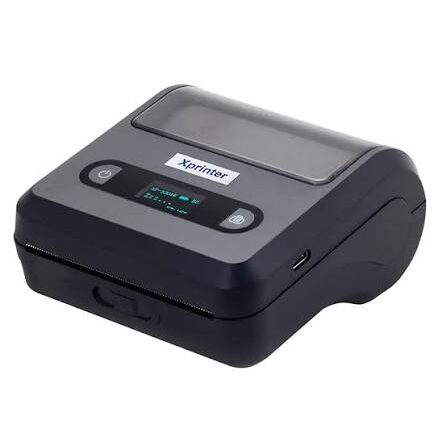
What Is an Xprinter Barcode Printer and How Does It Work?
Barcodes help businesses identify products, track inventory, manage shipments, and process sales quickly. Behind every readable barcode sits a printing process that needs to reproduce precise lines, spaces, or patterns on a suitable label.
An Xprinter barcode printer is designed to produce labels containing machine-readable information along with text, numbers, and graphics. The exact capabilities vary by model, but the basic process involves receiving barcode data from software, converting it into a printable format, and transferring the resulting pattern onto label media.
What Is a Barcode Printer?
A barcode printer is a specialized printer designed to produce labels with barcodes. Unlike a standard office printer, it typically uses label rolls and printing methods optimized for continuous or repeated label production.
The printed label can contain a barcode along with other information such as:
- Product name
- SKU or item number
- Price
- Serial number
- Tracking information
- Batch or lot number
The barcode provides machine-readable information, while the accompanying text helps people identify the item without scanning it.
How Does a Barcode Printer Work?
The printing process starts with software that creates or receives the barcode data. This information may come from inventory software, a point-of-sale system, shipping platform, or label-design application.
The software sends the print instructions to the printer. The printer then processes the data and determines which areas of the label need to receive the printed image.
The print head creates the barcode pattern as the label material moves through the printer. Once the process finishes, the printed label exits ready for application or scanning.
How Does the Printer Create a Barcode?
A barcode consists of patterns that represent specific information. The printer does not need to understand the meaning of the product or tracking number itself.
Instead, compatible software converts the information into a barcode format. The printer receives the resulting print instructions and reproduces the required pattern with precise lines and spaces.
The accuracy of this process matters because scanners rely on the contrast and spacing of the printed elements to decode the barcode.
Direct Thermal Barcode Printing
Direct thermal printing uses heat-sensitive label material. The printer’s heated print head activates specific areas of the label, creating the dark pattern that forms the barcode.
This method does not require a traditional ink cartridge or toner. It often suits applications such as shipping labels, receipts, tickets, and short-term identification.
However, direct thermal labels may change when exposed to high temperatures, prolonged sunlight, or other environmental factors.
Thermal Transfer Barcode Printing
Thermal transfer printing uses a ribbon to transfer ink onto the label surface.
This method can work with various label materials and often suits applications where the printed barcode needs to remain readable for an extended period.
The correct ribbon depends on the label material and the environmental conditions the finished label will encounter.
Why Barcode Print Quality Matters
A barcode can look acceptable to the human eye and still fail during scanning. Small distortions, insufficient contrast, incorrect dimensions, or damaged printing can interfere with barcode readers.
For reliable scanning, pay attention to:
- Barcode size
- Print resolution
- Contrast
- Quiet zones around the code
- Label material
- Printer settings
Testing the finished label with the scanner you actually use provides a more useful result than judging the print visually.
Also, explore Thermal Receipt Printer Buying Guide for Retail and Hospitality Businesses
What Types of Barcodes Can Be Printed?
The exact barcode formats supported depend on the printer software and application.
Common barcode categories include one-dimensional barcodes and two-dimensional codes.
One-Dimensional Barcodes
These use a series of parallel lines and spaces. Examples include formats commonly used for retail products, inventory, and logistics.
Two-Dimensional Codes
Two-dimensional codes use patterns of squares or other shapes to store more information in a compact area. QR codes provide a familiar example.
The printer reproduces the code generated by compatible software rather than independently deciding which barcode format to use.
Where Are Barcode Printers Used?
Barcode printing appears across many industries and workflows.
Retail
Retailers use barcodes for product identification, pricing, and checkout. Scanners read the code and connect it with information stored in the business’s system.
Warehousing
Warehouses use barcode labels to identify products, shelves, bins, cartons, and storage locations.
Workers can scan labels during receiving, picking, stock counts, and dispatch operations.
Shipping
Shipping labels commonly contain barcodes that represent tracking information. Automated scanning throughout the delivery process helps carriers identify and route packages.
Manufacturing
Manufacturers can use barcodes to identify components, finished products, batches, and production stages.
The exact information stored in the barcode depends on the company’s tracking system.
What Makes a Good Barcode Label?
A good barcode label needs more than a correctly generated code. The physical label should also provide enough contrast and space for reliable scanning.
Choose a suitable label size and avoid shrinking the barcode so much that scanners struggle to read it. Keep the code away from folds, seams, curved edges, and areas likely to become damaged.
The label material should also suit the environment where the product or package will be used.
Barcode Printer vs. Regular Printer
A standard inkjet or laser printer can technically produce some barcode designs, but dedicated barcode printers offer features designed around label production.
A barcode printer typically works with rolls of label media and supports repeated printing of small, standardized labels. This makes it more practical for businesses that need labels regularly.
The choice depends on print volume, label format, workflow, and the type of media required.
What Should You Consider When Choosing One?
Start with the type and size of labels you need to print. Then consider the required print resolution, printing speed, connectivity, media compatibility, and printing technology.
You should also consider how often the labels will be scanned and the environment where they will remain.
For high-volume operations, consistent performance and media handling may matter more than a printer’s maximum advertised speed.
Final Thoughts
A barcode printer produces machine-readable labels by receiving barcode data from compatible software and reproducing the required pattern on label media. Depending on the model and printing method, it may use direct thermal or thermal transfer technology.
For reliable barcode scanning, focus on more than the printer itself. Label material, barcode dimensions, print quality, software, and environmental conditions all contribute to a successful barcode labeling system.